
How to Do the "I'm So Sorry I Lied" Trend
Updated October 23, 2026
The short version
Upload one clear photo to the ImSoSorryTrend studio, pick Fast or Pro, choose how many lies to stack (2–4) and a costume, edit the captions, and press Generate. Each slide is built from the previous image so the set stays the same photo. Download the numbered JPEGs and post them to TikTok as a photo carousel with a trending sound.
What you need
- One photo — yourself, a consenting adult, your childhood photo, a child you parent or guard, or your pet. JPG, PNG or WebP up to 10 MB; the short side needs at least 768 px after the 3:4 crop.
- A Google sign-in — the studio requires an account before generating.
- A credit pack — Fast is 6 credits and Pro is 24 credits per image, so a default 4-slide set costs 18 or 72. Packs start at $3 (300 credits).
Step 1 — Pick the right photo
A clear, front-facing shot with one subject works best — the AI needs a face (or a pet's face) it can keep identical across every slide. Waist-up or full-body both work; the image is center-cropped to 3:4 in your browser before it uploads.
Costume photos are the classic choice because the gap between homemade and store-bought is the funniest — but party looks, throwbacks and pets all work the same way.
Step 2 — Choose the mode, lies and costume
Fast (6 credits/image) is the default and fine for most photos. Pro (24 credits/image) keeps faces and fine costume details steadier across a longer chain. Then pick how many lies to stack — 2, 3 or 4 — which sets the slide count (3, 4 or 5), and the costume the first slide upgrades you into.
| Mode | What it does | Best for | Credits / image |
|---|---|---|---|
| Fast | Nano Banana 2.1 edits each step — quick and cheap | Most photos; first sets | 6 |
| Pro | Nano Banana Pro edits each step — steadier faces and details | Close-up faces, detailed costumes, 4–5 slide chains | 24 |
Step 3 — Write the captions
The studio pre-fills captions per costume and lie — "Look at my Halloween costume this year" on slide one, "Ok sorry, the hair was a wig" on the confessions. Every caption is editable except the last slide's, which is always "I'm so sorry" — that line is the format.
Keep them short and flat. The meme reads best when the confessions are deadpan: "Ok sorry, it wasn't a fancy party, just my kitchen."
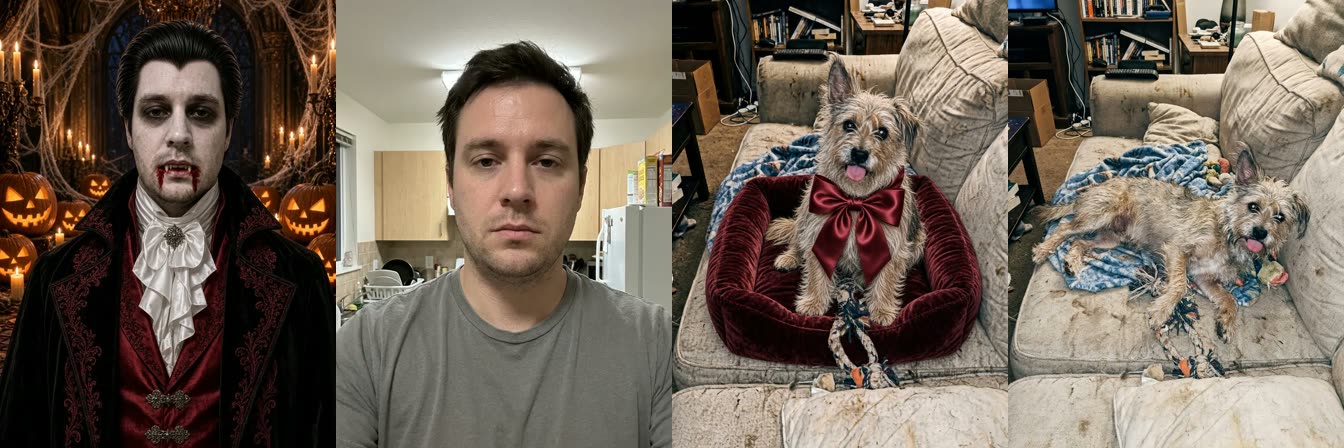
Step 4 — Generate the set
The run takes a few minutes and shows step-by-step progress. If you close the tab or lose signal, finished steps are kept and the run resumes when you come back — you are never re-charged for finished steps.
When it finishes you get a preview carousel in posting order: most-polished first, your real photo last.
Step 5 — Download and post
- Download single slides or the whole set as a ZIP — files are numbered in posting order (1 = most polished, last = real photo).
- In TikTok tap + → Upload → Photos, pick the slides in order, and add a trending sound — the slides themselves are silent.
- Post with a caption in the trend's spirit — the confessional works best played straight.
Photo checklist
Works well
- One clear face, front-facing, reasonably lit
- Your own childhood photo — the version that started the trend
- One pet per photo (a cat or dog in costume is ideal)
Avoid
- Group shots — the edit can only keep one subject consistent
- Sunglasses, heavy filters, motion blur or tiny faces
- Photos of other people's kids, public figures, or anything not yours to post
Troubleshooting
The face drifts between slides
Each slide is an edit of the previous one, so small drift compounds over a long chain. Use a sharper source photo, switch to Pro, or drop to 2–3 lies.
My photo was rejected
The short side needs at least 768 px after the 3:4 crop — upload a higher-resolution original. Group shots and unclear faces also fail more often.
A step failed mid-run
A confirmed failed step returns its charged credits automatically after refund processing, and retrying continues from that step — finished steps are kept.
The captions look wrong on the slides
Captions are burned at 1080×1440 — keep them under about 60 characters so they stay on one or two lines. The last slide's caption is fixed and can't be edited.
Keep reading
FAQ
No. The slides are generated and captioned here — you only need TikTok to post them as a photo carousel.